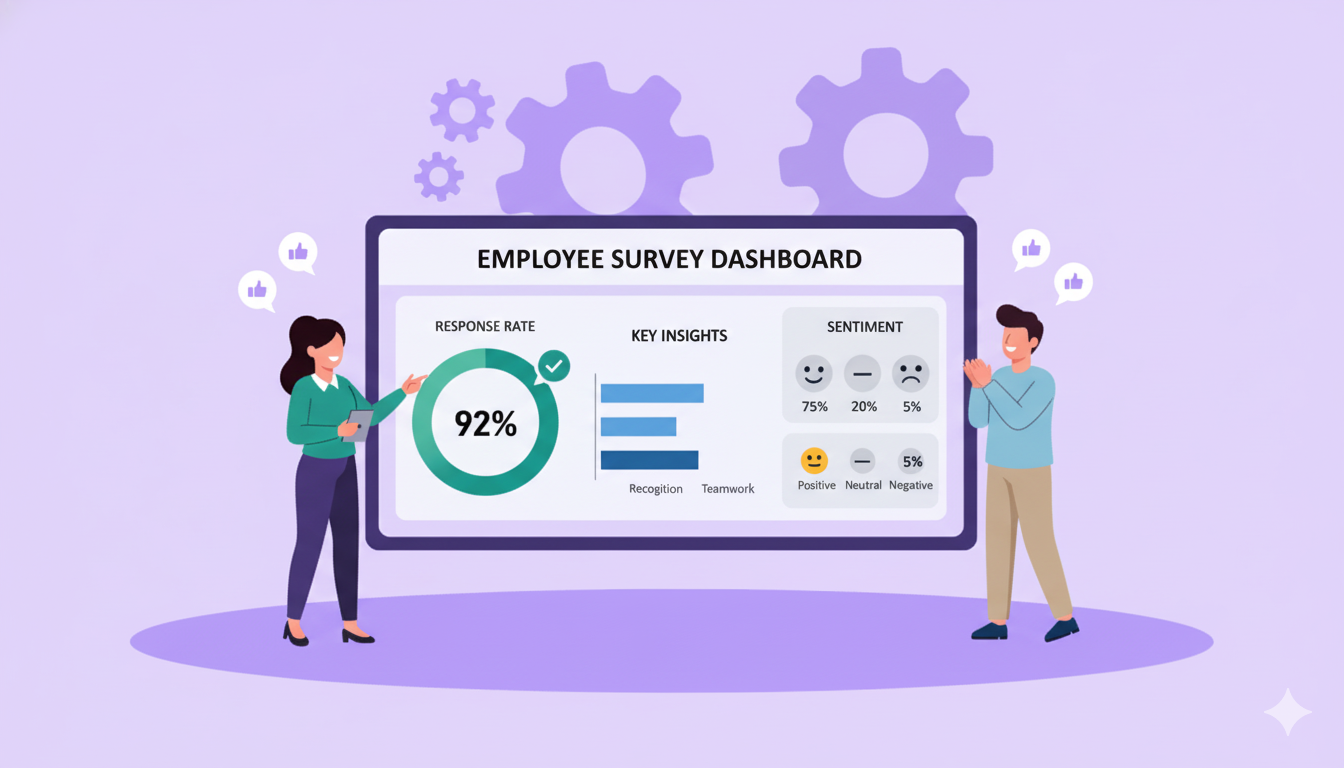


You've probably walked past one without thinking twice. A touchscreen near a hotel checkout, a smiley-face panel outside a clinic room, a tablet in a factory breakroom asking how your shift went. You tap an answer and you're done in ten seconds.
That's a kiosk survey. And while they look simple, they solve a problem that most feedback programmes quietly struggle with: getting people to actually respond.
Email surveys depend on someone opening them later, when the moment has passed and the motivation has faded. Kiosk surveys catch people while the experience is still fresh. That changes both the quality and the volume of feedback you get back.
Whether you're looking to capture customer satisfaction, measure frontline employee engagement, or both, this guide covers what kiosk surveys are, how they work, where they're used, and what to look for when setting one up.
A kiosk survey is a quick feedback form that sits on a touchscreen in a physical location, like a shop floor, hotel lobby, clinic, or office breakroom. People answer a few short questions on the spot, without logging in, downloading an app, or opening an email. Their responses are then sent to a dashboard where teams can review the feedback in real time.
Key Takeaways
- What a kiosk survey is and how it works, from touchscreen interface to real-time data sync
- Six types of kiosk surveys and where each one fits
- Where they're used across retail, healthcare, hospitality, manufacturing, and HR
- How kiosk surveys compare to email surveys and mobile survey apps
- A four-step setup guide from placement to full rollout
- What real results look like, including a 67% participation rate in month one
- Seven best practices for designing kiosk surveys that people actually complete
What Is a Kiosk Survey?
A kiosk survey is a feedback form on a touchscreen terminal placed where people naturally pause: near a checkout counter, at a hotel exit, outside a clinic room, or in a factory breakroom. Respondents tap through a few questions and walk away. The screen resets for the next person.
Feedback kiosks have three core components:
- A touchscreen interface that requires no training, no login, and no app
- Location-based placement at the point of experience, not after the fact
- Real-time data sync to a central dashboard
Kiosk surveys are also referred to as feedback kiosks, survey kiosks, or kiosk polls depending on the context. The term changes; the mechanic stays the same.
How Does a Kiosk Survey Work?
A respondent approaches the screen, answers between two and ten questions, taps submit, and walks away. The kiosk resets within seconds. That simplicity is the entire design principle.
Simple touchscreen interface
Kiosk survey interfaces mirror the familiarity of a smartphone: large buttons, clear labels, swipe navigation. No instruction manual required. Most people figure it out without reading a word of guidance.
Auto-reset between users
Once a respondent submits, the kiosk clears all previous responses and returns to the start screen, typically within five to ten seconds. In high-traffic environments like hotel lobbies or factory floors, this keeps the flow moving without any manual intervention.
Real-time data sync
Responses go directly to a centralised dashboard. HR teams, store managers, or healthcare administrators can see results as they arrive, without waiting for an export or a weekly report.
Offline capability
Most kiosk survey platforms store responses locally when internet connectivity drops and upload them automatically when the connection restores. This makes kiosks practical in warehouses, remote facilities, and retail back-of-house areas where Wi-Fi is inconsistent.
QR code option
Many kiosk survey setups include a QR code alongside the screen. Respondents scan with their phone to complete the same survey on their own device. This is useful when queues form at a single terminal, or when a respondent prefers the privacy of their own screen.
Anonymous by design
The auto-reset and the absence of any login mean responses cannot be traced back to an individual. This matters most for employee surveys, where psychological safety directly affects how honest the responses are. Running a fully anonymous employee survey is only possible if respondents trust the mechanism. Platforms like Vantage Pulse display trust badges on the survey screen confirming that no name, email, or device identifier is ever recorded.
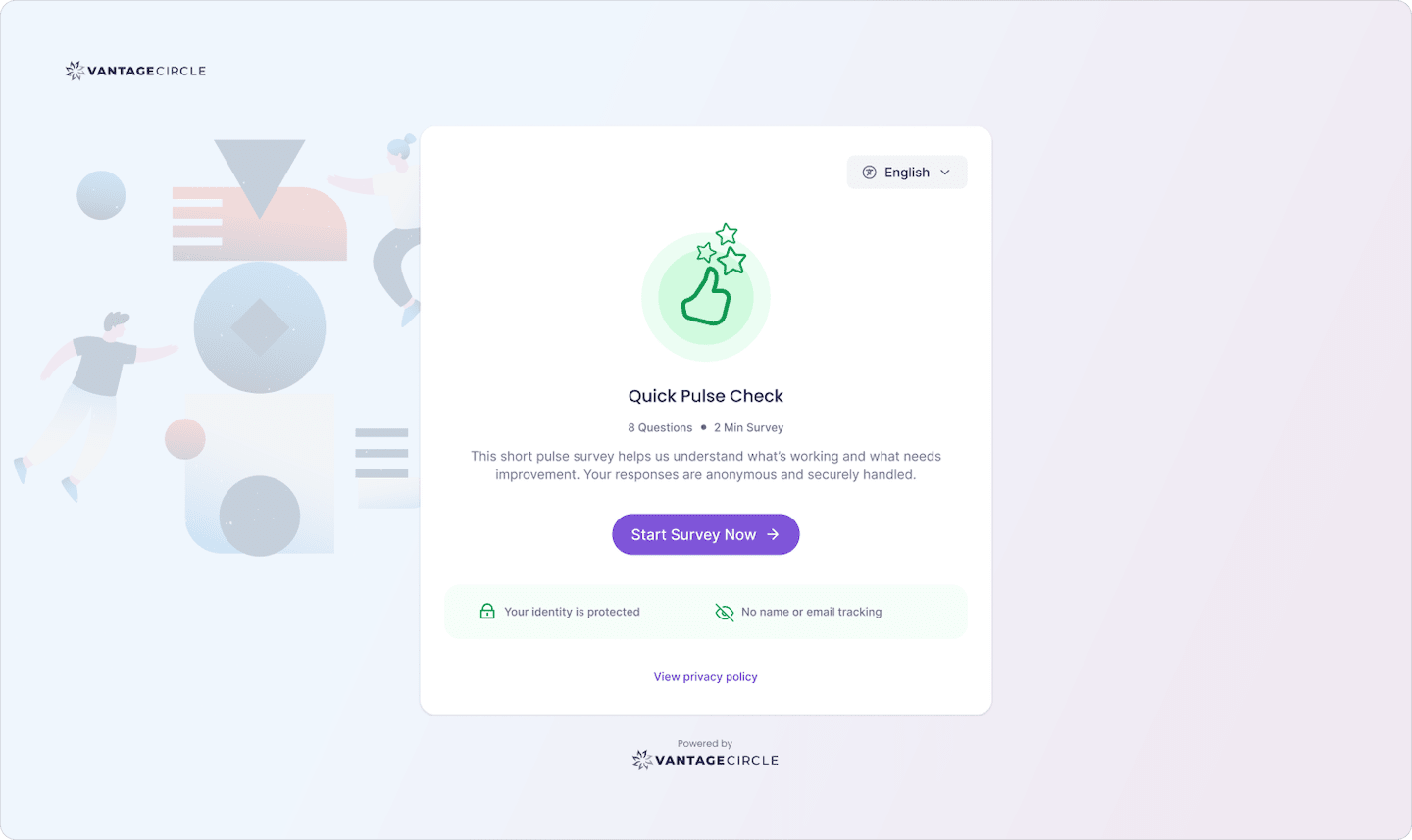
Source: Vantage Pulse
Types of Kiosk Surveys
Kiosk surveys are used across industries with different goals. The format stays the same; the questions and placement change.
| Type | Best for | Typical setting | Common format |
|---|---|---|---|
| Customer Satisfaction (CSAT) | Post-transaction feedback | Retail checkout, hotel lobby, bank branch | 1–5 star or numeric scale |
| Net Promoter Score (NPS) | Loyalty and advocacy measurement | Service exit points, telecoms stores | 0–10 scale plus one open text field |
| Smiley or emoji feedback | Quick, high-volume sentiment capture | Food courts, retail stores, transport hubs | 4-button emoji or colour scale |
| Employee feedback | Frontline and deskless workforce listening | Breakrooms, factory floors, locker areas | Rating scale plus one open-text question |
| Patient experience | Healthcare satisfaction | Clinic exits, hospital wards, pharmacy counters | Short rating scale with verbal descriptors |
| Event feedback | On-the-spot attendee response | Conference exits, exhibition halls | 3–5 rating questions |
Recommended Resource: If the employee feedback row caught your eye, this complete guide to building a listening culture through employee surveys is a good next read.
Where Are Kiosk Surveys Used?
The practical strengths of modern feedback kiosks, specifically offline capability, auto-reset, multilingual support, and real-time dashboards, make them useful across a range of industries. Here is how each one uses them.
Retail
Physical feedback kiosks for retail stores are typically placed near checkout points or exits. A customer rates their experience in two taps while waiting for a receipt. Smiley face feedback systems, common in retail, use a four-button emoji row to capture sentiment at high speed and low friction. For retail staff, kiosks in break areas capture shift-level morale without requiring employees to open an app or check email. Getting that feedback is step one. The rest of the work of keeping a retail workforce engaged builds from there.
Healthcare
Clinics and hospitals place kiosks at exit points, pharmacy counters, and ward exits. Patients rate their experience before they leave the building. Most post-visit surveys sent by email never get filled in. For staff, the same problem applies: nurses, technicians, and support workers are on their feet all day and rarely at a desk. A kiosk near the staff exit is often the only realistic way to hear from them. The broader engagement challenges in healthcare run deeper, but that is where they tend to surface first.
Hospitality
Hotels place feedback kiosks at checkout desks and restaurant exits. For a group running multiple properties, kiosk data by location lets the operations team identify service gaps across sites without relying on online review monitoring.
Manufacturing and logistics
Hourly worker feedback collection is one of the harder problems in operations and HR. Workers in manufacturing or logistics facilities often work rotating shifts, have limited email access, and are unlikely to respond to surveys sent outside working hours. Kiosk terminals near time clocks or break rooms are often the only way to capture feedback from manufacturing workers who would otherwise never appear in engagement data at all.
HR and people operations
For HR teams managing deskless or frontline employees, kiosk surveys are often the only scalable listening channel that actually reaches the people being surveyed. This is covered in detail in the employee feedback section below.
Kiosk Survey vs Email Survey vs Survey App
Choosing between a kiosk survey tool, an email survey, and a mobile survey app depends primarily on who you are trying to reach and where they are when you reach them.
| Channel | Who it reaches | Response rate | Setup requirement | Best for |
|---|---|---|---|---|
| Kiosk survey | Anyone physically present at the location | High: in-person placement removes the need for any action by the respondent | One-time hardware or tablet setup plus platform configuration | In-location feedback, deskless workers, retail customers, frontline teams |
| Email survey | Desk workers with regular email access | Low to medium: depends on sender trust, subject line, and timing | Low setup cost; requires a contact list and ongoing list management | Office-based teams, post-event follow-up, remote employees |
| Survey app (mobile) | Smartphone users who have the app installed | Low: requires install and an active choice to open the app | App installation and account creation required per respondent | Field research teams, remote workers, targeted employee cohorts |
A customer feedback kiosk versus a survey app is not a technical comparison. It is a question of where the respondent is and whether you can get them to act. Kiosks remove the action step entirely. The terminal is already in the room, already on, and already waiting.
The tradeoff is coverage. Email surveys reach people who are not physically present. If the goal is capturing feedback from customers after they leave your store, or from employees working remotely, email or mobile remains the right channel. Kiosks and digital surveys work best as complements, not replacements. If response rates are already low, it is worth understanding why employee surveys fail before committing to any single channel.
How to Set Up a Kiosk Survey
1. Place the kiosk where people already pause
The most effective kiosk placements are near microwaves, time clocks, locker areas, and checkout counters. The survey becomes part of the natural flow rather than an extra step. A kiosk placed in a back corridor that no one walks through is effectively invisible.
2. Write questions people actually want to answer
Avoid corporate phrasing. "Rate organisational communication effectiveness" gets worse data than "Did you get the information you needed to do your job today?" Keep surveys to five or six questions with one open text field. If it takes longer than 90 seconds to complete, it is too long. Writing questions from scratch is harder than it looks. Borrowing from 35 ready-to-use pulse survey questions for HR leaders is a faster starting point.
3. Choose a kiosk feedback platform that handles the practical problems
The right kiosk survey software locks the device in survey mode to prevent misuse, auto-resets between users, stores responses offline when connectivity drops, and pushes results to a dashboard without manual exports. When evaluating platforms, check specifically for offline sync, automatic device management, and HRIS integration. These are the features that determine whether a kiosk survey programme actually runs itself or requires constant maintenance.
4. Pilot on one floor, then roll out
Run a two-day pilot in one location before a full rollout. This surfaces practical issues: screen glare, button size, language gaps. On launch day, have managers mention the kiosk briefly during shift handovers. One sentence explaining that responses are anonymous and reviewed weekly can meaningfully lift early participation.
Kiosk Surveys for Employee Feedback
The employee feedback use case is where kiosk surveys create the most organisational impact, and where they are most commonly underused.
According to BCG, 70% to 80% of workers worldwide are deskless. Warehouse staff, nurses, retail associates, factory workers, and logistics teams make up the majority of many organisations' headcounts. They are also the people most likely to be excluded from traditional survey programmes, not by design, but because email surveys assume desk access that those workers do not have. The result is that employee survey participation rates look artificially low, and engagement data reflects only the desk-based minority.
Which employee feedback kiosk works best for workplace satisfaction?
For HR teams asking this question, the answer depends less on the hardware and more on what happens to the data afterward. A kiosk that generates a spreadsheet is not meaningfully better than a paper form.
The platforms that create real value connect kiosk responses to segmented dashboards, surface category-level scores by department or location, and give HR an actionable view without requiring manual data work. Employee feedback kiosks and terminals for workplace satisfaction need to do more than collect data. They need to surface it in a way that tells HR where to focus.
On Vantage Pulse, kiosk and QR code access is enabled with a single toggle at survey creation. Frontline employees scan a QR code or tap the kiosk screen, complete the survey anonymously, and the responses feed into the same engagement dashboard used for the rest of the organisation. HR sees participation rates, eNPS by department, category scores across areas like recognition, peer relationships, and manager relationships, and a heatmap of where scores are weakest.
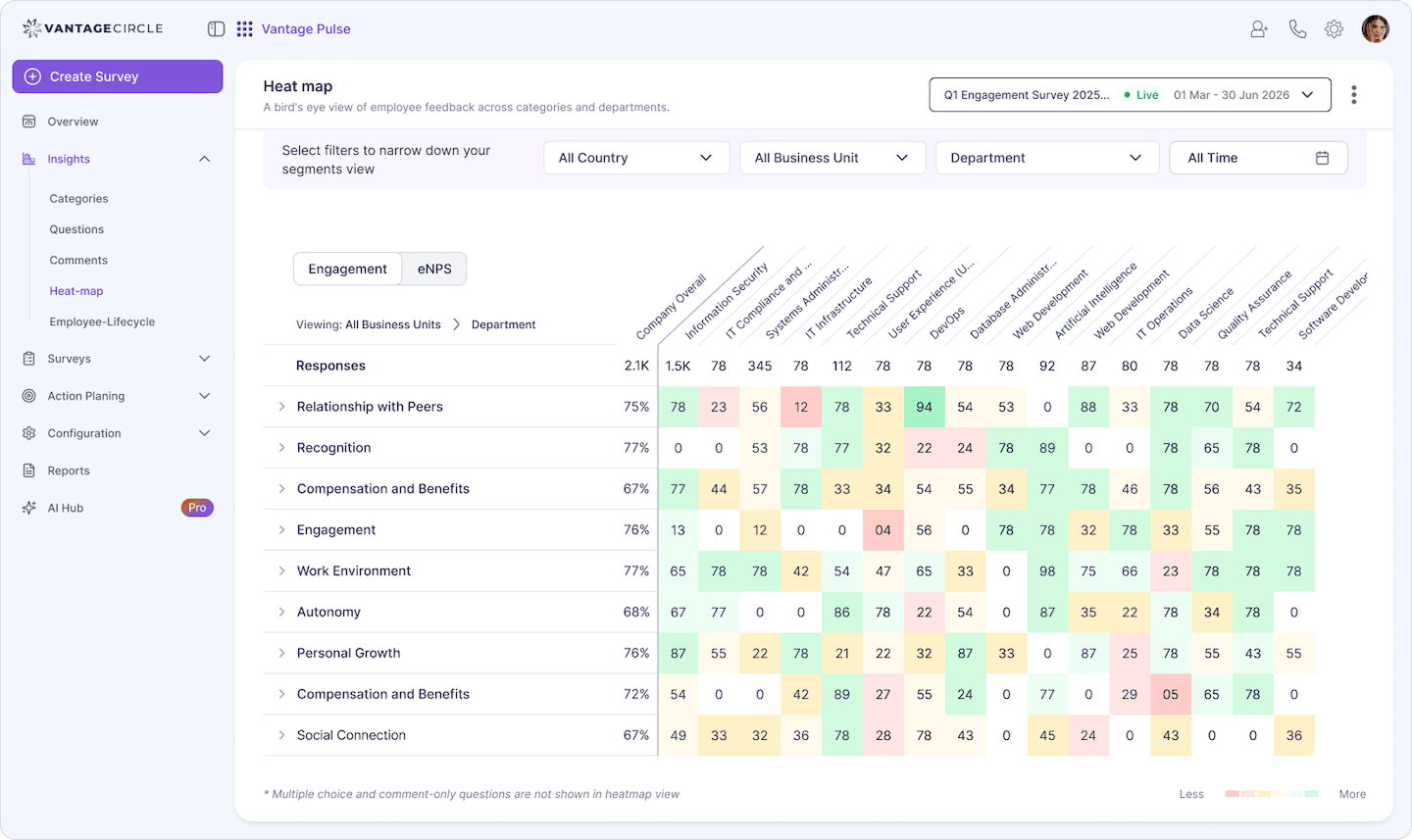
Source: Vantage Pulse
The heatmap shows department-level scores across categories. Scores below 60 appear in red. A single team showing a peer relationship score of 20 stands out immediately. That is the kind of signal that is only possible when the deskless majority is actually included in the data, not just the people who open their email.
What the results look like in practice
The numbers from AccessOne's first month on Vantage Pulse show what happens when deskless workers are actually included in the survey.
Participation reached 67%, well above the 30% to 50% typical across Vantage Pulse's client base. Their eNPS came in at 45, against an industry average of 10 to 30.
Three cultural strengths surfaced immediately: peer relationships, work environment, and relationships with managers. One critical alert stood out: the Customer Success team's peer relationship score registered at 20, flagged in red. That single data point gave HR a specific problem to address rather than a vague sense that something was off in that team.

Seeing honest feelings in real numbers? Priceless. We could actually watch morale lift after each change.
Cassidi Ross, HR Coordinator, AccessOne
The 67% figure matters because it reflects a workforce that was previously unreachable by email. Removing the friction removed the barrier.
Best Practices for Kiosk Survey Design
A well-placed kiosk with a poorly designed survey produces low participation and low-quality data. The key features of modern feedback kiosks are only as effective as the questions on them.
1. Keep it to three to five taps.
A visible progress indicator or time estimate removes the main reason people abandon mid-survey: uncertainty about how long it will take. Longer surveys also risk survey fatigue, which reduces both completion rates and response quality over time.
2. Design for the actual user.
Factory and warehouse workers often interact with kiosks in work gloves, under overhead lighting, with limited time between tasks. Buttons should be large with generous spacing. Screens should be mounted below eye level, angled away from overhead lights. A matte screen protector reduces glare. Sanitising wipes nearby reduce hesitation.
3. Include a language toggle.
A two-character toggle ("EN / ES") in the top corner serves multilingual workforces more effectively than bilingual posters.
4. Rotate questions on a schedule.
Keep each survey short and replace one question per week. Over a month you cover significantly more ground without extending the time it takes to complete.
5. Make the auto-reset visible.
An eight-second countdown before reset tells the next respondent that the previous person's answers are gone. It removes a real privacy concern that reduces participation, particularly among employees who worry about being identified by their manager.
6. Close the loop publicly.
A small notice posted next to the kiosk ("You asked for new locker shelves, they arrive Friday") does more for participation rates than any internal communications campaign. People respond to surveys when they believe the responses will be acted on. How you communicate survey results to employees directly determines whether they bother responding to the next one.
7. Meet WCAG accessibility standards.
18-point minimum font, high-contrast colour combinations, and clear focus outlines are the floor. In low-light manufacturing or logistics environments, this is not optional.
Conclusion
Kiosk surveys work because they meet people where they already are. No login, no email, no friction. The screen is on, the question is simple, and the response takes under a minute.
That matters more than most HR teams realise. A survey strategy built around email excludes the majority of the workforce before a single question is asked. The engagement data that comes back looks complete. It is not. It reflects the desk-based minority while the warehouse floor, the clinic ward, and the retail backroom go unheard.
Getting those voices into your data does not require a complex rollout. It requires placing the right terminal in the right location, keeping the survey short, and making sure the results lead to visible action. When those three things happen, participation follows.
FAQs
1. What is a kiosk survey?
A kiosk survey is a quick feedback form that sits on a touchscreen in a physical location, like a retail store, hospital, hotel, or workplace breakroom. People answer a few short questions on the spot, without logging in, downloading an app, or opening an email. Their responses are sent to a dashboard where teams can review the feedback in real time. Kiosk surveys are also referred to as feedback kiosks, survey kiosks, or kiosk polls.
2. What types of kiosk surveys are there?
The main types are customer satisfaction (CSAT), Net Promoter Score (NPS), smiley or emoji feedback, employee feedback, patient experience, and event feedback. Each uses the same touchscreen format but differs in question structure, placement, and the audience being measured.
3. How is a kiosk survey different from a survey app?
A kiosk survey is a fixed terminal at a physical location. No installation, login, or phone is needed. A survey app requires the respondent to have a smartphone, have the app installed, and actively choose to open it. Kiosks achieve significantly higher response rates in physical environments because they remove those steps entirely. The comparison between a customer feedback kiosk and a survey app is primarily a question of where the respondent is when you need them to respond, and whether they will take any action to do so.
4. How do you set up a survey kiosk?
The core steps are: place the kiosk where respondents naturally pause, write short direct questions (five or fewer), select a kiosk survey platform that supports offline sync and auto-reset, and pilot in one location before a full rollout. Connecting the platform to your HRIS ensures that employee attributes like department and shift flow in automatically, making segmentation possible from day one.
5. Which kiosk survey platform is best for employee feedback?
For HR teams, the right platform connects kiosk responses to a segmented engagement dashboard, surfaces scores by department and category, and gives HR an actionable view without manual data work. Vantage Pulse includes a kiosk and QR code survey mode that feeds into the same dashboard used for all other survey channels, with heatmap views, eNPS tracking, and AI-assisted feedback analysis.
Written by