When teams went remote, a great many managers discovered that what they had been calling management was mostly proximity. Seeing someone at a desk had quietly stood in for knowing what they were working on, and a nod across the office had passed for recognition, so once the desks emptied out, the instinct was to rebuild that visibility by any means available. That usually meant more video calls, more status updates, and the occasional piece of tracking software nobody admitted to installing.
None of it solved the real problem, because remote teams rarely struggle with being unseen. They struggle with not knowing what is expected of them, whether their work registers with anyone, and whether anyone will notice when they start quietly falling apart. Those are questions good managers were meant to be answering all along, and the eight practices that follow are about answering them deliberately, now that the office is no longer there to fake it.
What does managing remote employees involve?
Managing remote employees involves the same goals as managing anyone, but you replace observation with agreements, rhythm and deliberate visibility. Three things change the moment a team stops sharing a room.
You can no longer see effort directly, so you have to agree on what "done" looks like before the work starts. Informal information, the kind that used to travel across a desk or in a hallway, has to be written down and sent somewhere on purpose. And visibility becomes unequal: some people are naturally in front of you more than others, on calls, in the office, in your line of sight, and they tend to get noticed and recognized more often for it.
30% of employees still feel unseen at work, according to The Recognition Effect (Great Place To Work® India × Vantage Circle, 2025).
In a distributed team, the people most at risk of feeling unseen are the ones furthest from you, whether that means a different time zone, a different office, or simply a quieter personality. Building that visibility back in, on purpose, is most of what managing remote employees actually means in practice. It overlaps with running virtual teams and hybrid workforce best practices generally, but recognition and visibility carry more weight here because you can't rely on simply being present.
8 practices for managing remote employees
Here are eight practices that replace the habits that stopped working once your team went remote.
1. Agree on outcomes, not hours
Judge remote work by agreed results and deadlines, not by online status or hours logged. If you're still tracking activity, like login times or a green dot on chat, you're measuring the wrong thing and teaching your team to perform availability instead of doing the work.
For each role, write down three lines: the result you expect, how you'll measure it, and when you'll review it together. That agreement replaces the oversight you used to get by walking past a desk, and it holds up whether someone works nine to five or splits their day around school pickup. It's also the fastest way to stop micromanagement, since there's nothing left to micromanage once the outcome is the only thing being judged.
2. Write a team communication charter
A communication charter tells everyone which channel to use for what, and how fast to reply. Without one, every message becomes urgent by default, because nobody knows whether to expect an answer in five minutes or by end of day.
| Channel | Use it for | Expected reply time |
|---|---|---|
| Chat | Quick questions, status updates | Within a few hours |
| Decisions, documentation, anything external | By end of day | |
| Video call | Discussion that needs back-and-forth | Scheduled in advance |
| Project tool | Task assignments, progress tracking | Checked daily, not real time |
| Phone or urgent flag | Genuine blockers only | Immediate |
Most of the charter can run async, meaning people reply in their own time rather than live, which is what makes a charter possible in the first place: nobody has to be online at the same moment to stay unblocked. Put this table somewhere every new hire sees in week one, and revisit it if the team keeps overriding it with "quick calls" that should have been a message. This is also where remote team collaboration practices and tooling choices belong, not in this guide.
3. Run a predictable weekly rhythm
A fixed rhythm replaces the hallway check-in: people know when they'll get your time, so they stop needing to chase it. The table below is the rhythm itself, built around the 1:1, a short one-on-one conversation between a manager and a direct report, as the anchor of the week.
| Rhythm | What happens | Time it takes | Output |
|---|---|---|---|
| Daily | Written async update: what I did, what's next, blockers | 5 minutes each | Blockers cleared the same day |
| Weekly | 1:1 with each report, plus a 30-minute team sync | 30 minutes per person | Priorities set, effort recognized |
| Every two weeks | Recognition check: who hasn't been recognized recently? | 10 minutes | No one stays invisible for long |
| Monthly | Career or development conversation, plus a pulse check | 30 minutes | Growth plan, early warning on workload |
| Quarterly | Outcome review and team retrospective | 60 minutes | Reset goals, fix what isn't working |
A monthly pulse check is the rhythm's early warning system. Short, anonymous pulse surveys that take under a minute to answer on a phone can catch a workload or isolation problem well before it surfaces in a 1:1.
4. Make 1:1s the center of the week
The weekly 1:1 is the remote manager's most important meeting, because it's where problems surface early. Run it with a simple four-part agenda, in this order: their topics first, then blockers, then recognition, then one development question. That order matters, because starting with your own agenda trains people to save their real concerns for later, or not raise them at all.
If a 1:1 keeps getting canceled or shortened, that's a signal on its own. For the harder conversations, remote feedback examples can help you find the right words without losing the relationship.
5. Recognize on a schedule, not by proximity
Remote employees get recognized less when recognition depends on who the manager happens to see, so put it on a schedule instead.
Fewer than 20% of US employees are recognized every quarter, according to AIRe Benchmarking Report USA 2023-24 (Vantage Circle).
That gap is exactly what Kriti Mehrotra, Senior Lead, Total Rewards at Synamedia, named on the Vantage HR Influencers Podcast: "Remote employees might feel aloof if they are not present and there can be a proximity bias, which is the term we use, right? We have to avoid proximity biases that if you're closer to the location where the manager is sitting, your chances of being seen is more and you get more recognition."
One way to counter it is to make recognition visible in the tools your team already has open all day. When Vantage Rewards gives and shows recognition inside Microsoft Teams, in the same thread where the work was shared, it happens while the work is still fresh and the rest of the team sees it too.
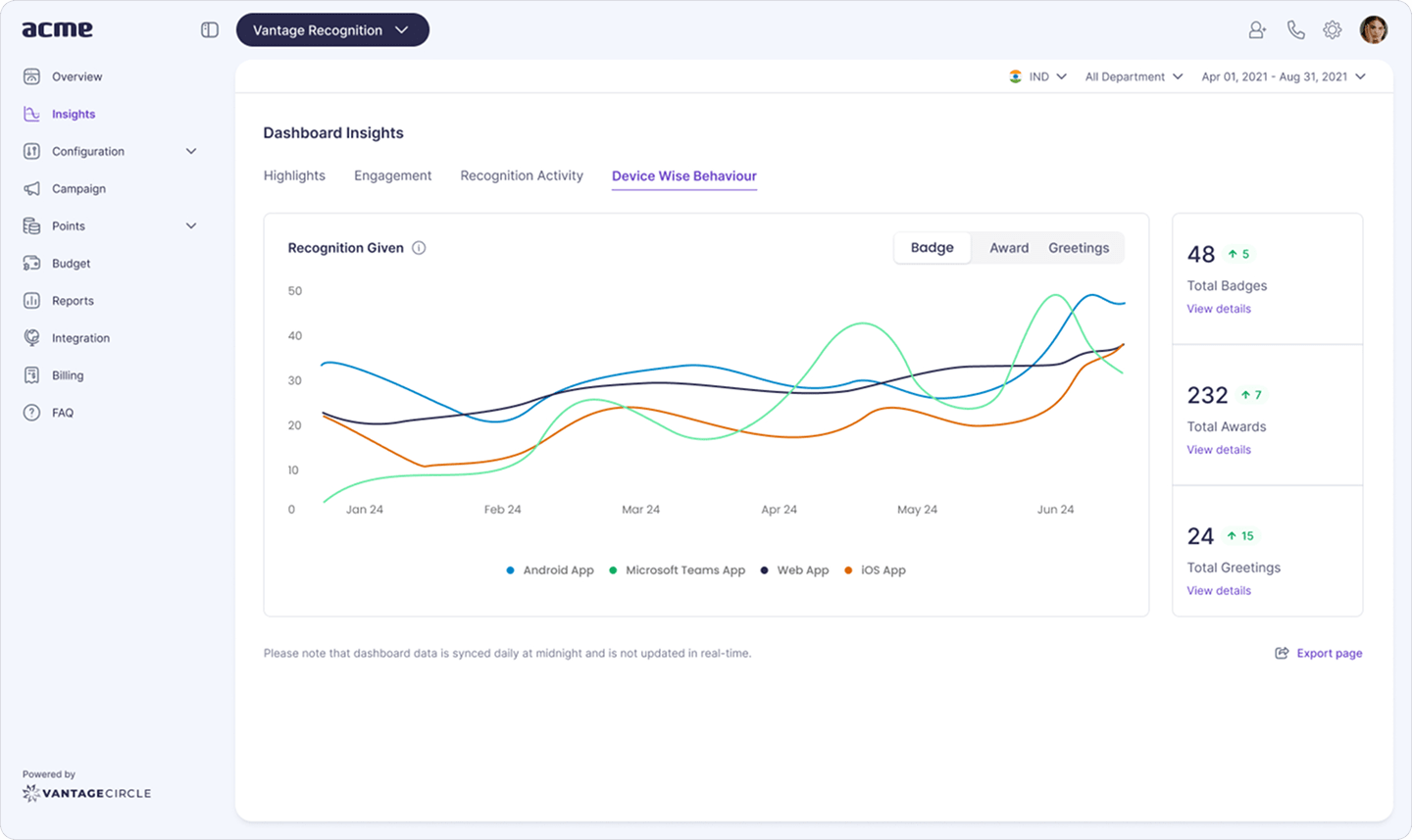
Putting recognition on a schedule works at scale too. Since 2022, Qualitest's recognition program has recorded at least 1 recognition every hour, making appreciation a continuous part of the workplace rather than an occasional event tied to who was in the room.
See it in action: Explore Vantage Rewards
Read more on program design in recognizing remote employees, or start with the fundamentals in our guide to employee rewards and recognition.
6. Watch workload and well-being, not keystrokes
Look for workload and isolation signals in 1:1s and pulse surveys, not through activity-monitoring software used as a substitute for trust. Four signs worth a direct, private check-in: messages sent late at night, missed updates from someone who's usually reliable, a camera that's suddenly always off, and replies that get shorter over time.
Remote employees rarely tell a manager directly that they're overloaded. Anonymous questions through tools like Vantage Pulse give them a safer way to say it, which gives you signal without monitoring anyone's screen. If isolation or burnout shows up as a real pattern, treat it as seriously as a missed deadline, and back it with benefits that work the same from home as from the office, which is the premise behind Vantage Perks' wellness benefits. For employee burnout specifically, treat any statistic you quote to the team as something to source and date, not something to assume.
7. Write things down
If a decision isn't written down, remote employees in other time zones didn't hear it. Keep a running decision log, one line per decision, who made it and why, plus a short team handbook covering the things new hires always ask in week one: who owns what, where files live, how time off works. Neither needs to be fancy. It just needs to outlive the meeting where the decision got made.
8. Build connection on purpose
Connection doesn't happen by accident in remote teams, so schedule small rituals for it. A standing five minutes at the start of a weekly call for non-work talk, a rotating "ask me anything" slot, or a shared channel for wins, big or small, all do the same job: giving people a reason to interact beyond the task at hand.
79% of high-effectiveness recognition programs recognize both the team and standout individuals when celebrating collective achievements, compared with 37% of other programs, according to The State of Recognition & Rewards 2025 (Vantage Circle).
That's also true of recognition itself. A shared social recognition feed does the job the office noticeboard used to: it shows remote colleagues what others are achieving, which is the raw material that connection is built from. Pair team wins with individual callouts rather than one or the other, and round out the rhythm with virtual team building activities or a quick set of icebreakers for remote teams when a meeting needs a reset.
Proximity bias: a monthly checklist for hybrid managers
Proximity bias is the tendency to rate, recognize and promote people you see in person more favorably than remote colleagues doing the same work. It's rarely intentional, which is exactly why it needs a checklist instead of good intentions.
| Check | What good looks like |
|---|---|
| Recognition count by location | Remote and in-office employees are recognized at roughly the same rate |
| Stretch assignments by location | High-visibility projects aren't quietly going to whoever's in the room |
| Who speaks in meetings | Remote voices get as much airtime as the people around the table |
| Meeting times across time zones | No single location carries all the inconvenient slots |
| Promotion shortlist mix | The shortlist reflects the team's actual location mix, not just who's visible |
| 1:1 frequency by location | Remote reports get 1:1s as often as anyone else, not "when there's time" |
| Decisions made in hallway conversations | Decisions get written down and shared, not just assumed known |
| Visibility with leadership | Remote employees get direct exposure to leadership, not only through their manager |
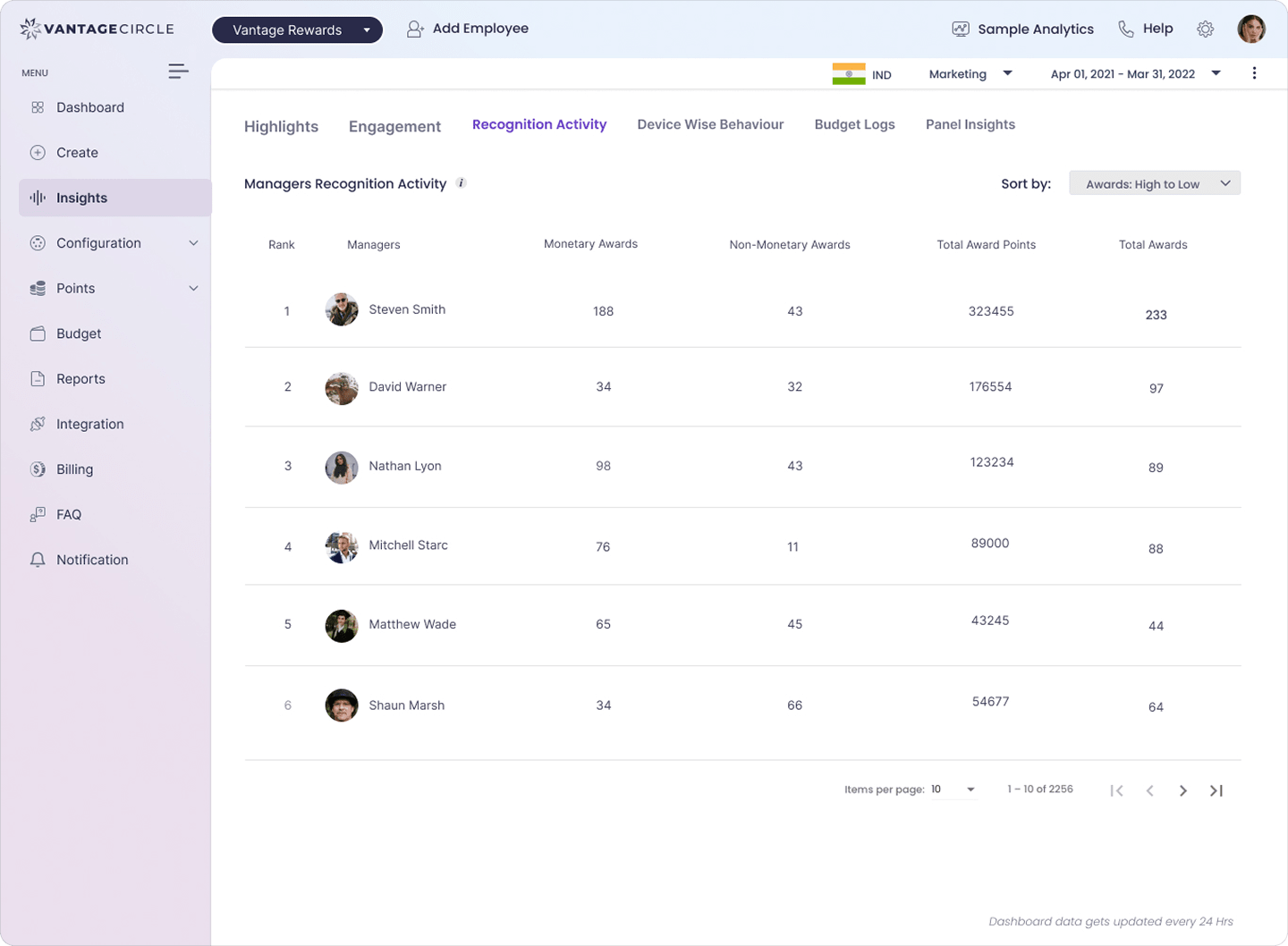
A manager recognition activity report, split by team, makes the first check a simple count instead of a guess. It shows quickly whether remote staff are being recognized as often as the people managers see every day, which turns proximity bias from a feeling into something you can actually measure and fix. This checklist also pairs well with how you engage remote employees more broadly.
What to avoid when managing remote employees
The five most common mistakes are micromanaging, tracking activity instead of results, running too many meetings, leaving priorities unclear, and recognizing only the people you happen to see.
Micromanagement erodes the trust that remote work depends on, so judge the outcome, not the hours. Activity tracking measures the wrong signal and tells your team you don't trust them. Meeting overload eats the focus time remote work is supposed to protect, so default to async first and reserve calls for genuine discussion. Unclear priorities hurt more remotely, because there's no hallway conversation to quietly correct course. And recognizing only who you see in person is one of the fastest ways to lose a good remote performer, since being overlooked repeatedly is a common reason people start job hunting.
A clear work from home policy prevents most of this from becoming a pattern in the first place, by setting expectations once instead of relitigating them team by team.
Tools that support remote management
You need four kinds of tools: a chat tool, a video tool, a shared project board, and a way to recognize people. Chat covers quick, asynchronous questions. Video covers discussion that genuinely needs back-and-forth. A shared project board keeps work visible without a status-update meeting. And a recognition tool makes sure good work gets seen by more than just you.
Which specific products you pick matters less than making sure all four exist and that your team actually uses them the way your communication charter describes. A tool nobody opens isn't solving anything.
Conclusion
Managing remote employees well rarely calls for more management, only management that is deliberate rather than assumed. That is why the weekly rhythm table and the proximity-bias checklist are the best places to start, since one replaces scattered "just checking in" pings with a schedule people trust, and the other keeps recognition from drifting toward whoever sits closest.
After all, the office never offered anything magical, just an unplanned glimpse into who needed help and who had earned credit. Remote teams lose that glimpse by default, so it has to be scheduled back in, one check-in at a time.
FAQs
1. How do I fire a remote employee?
Deliver the news by live video, never by email or chat, with HR present and a prepared script so the conversation stays clear and consistent. Plan equipment return and system access cutoff in advance, and follow the employment law that applies to where the employee is located, since remote teams often span more than one jurisdiction. This is practitioner guidance, not legal advice; check with HR and legal before acting.
2. What must be avoided during remote work?
Avoid micromanaging, tracking activity instead of outcomes, overloading the calendar with meetings that could have been an async update, leaving priorities unclear, and recognizing only the people you happen to see most. Each of these erodes the trust that remote work depends on faster than it would in an office, because there's no hallway conversation to quietly correct the drift.
3. Are fully remote workers happier?
It depends more on how well the arrangement is managed than on the arrangement itself. Gallup's research on hybrid and remote work has found that engagement varies more with management quality, clarity of expectations and the manager relationship than with location alone, so there's no single, reliable answer to whether fully remote workers are happier than hybrid or in-office employees.
4. How many direct reports should a remote manager have?
There's no fixed rule, but many managers treat six to eight direct reports as the practical ceiling for keeping weekly 1:1s and real visibility into each person's work. Remote management tightens that ceiling rather than loosening it, because there are fewer informal touchpoints, like a quick desk-side chat, to catch what a 1:1 misses. Past that number, something in the operating rhythm, usually recognition or the 1:1 agenda, starts slipping first.
5. Should remote employees be paid the same as people in the office?
There's no single standard. Some companies pay the same regardless of location to keep pay bands simple and avoid a perception of unfairness; others adjust pay using cost-of-labor data for where the employee lives. What matters more for retention than which model you pick is applying it consistently and explaining the reasoning clearly, since an unexplained pay difference damages trust faster than the pay gap itself.

Shaoni Gupta is a content marketing specialist at Vantage Circle, with expertise in scriptwriting and copywriting in the field of employee rewards and recognition.
Connect with Shaoni on LinkedIn.


